
Easier navigation for bus passenger on Mitra Darat mobile apps

Company
Personal project
Time span
1 week
Role
Product Designer
Product
Mitra Darat

Summary

This time I want to talk about Mitra Darat app. So this app is a companion app if we want to go using land transportation type, especially bus.

The story started when I wanted to go to watch a movie last week but my motorbike and car was unavailable, but I don't want to use the online transport as it was pricey, so I decided to go using public transport instead. But I find it difficult to define: from where should I start using bus? where should I stop?. And in the end, I just asked the bus conductor, but I think this app can do more than just to live-track the bus.

The feature design scope is scope yet untested as I just want to explore on how crazy can I solve this problem. Anyway, I also asked few passengers and observed the others as well, so I can say that some of my insights here is relevant. But this problem is only small compared to the whole service level, so there might be always the more urgent things that must be fixed on the service level and way deeper researches will be needed to evaluate the current surface problems, like the efficiency of the payment of the bus, more proper way to wait at the bus stop, etc.
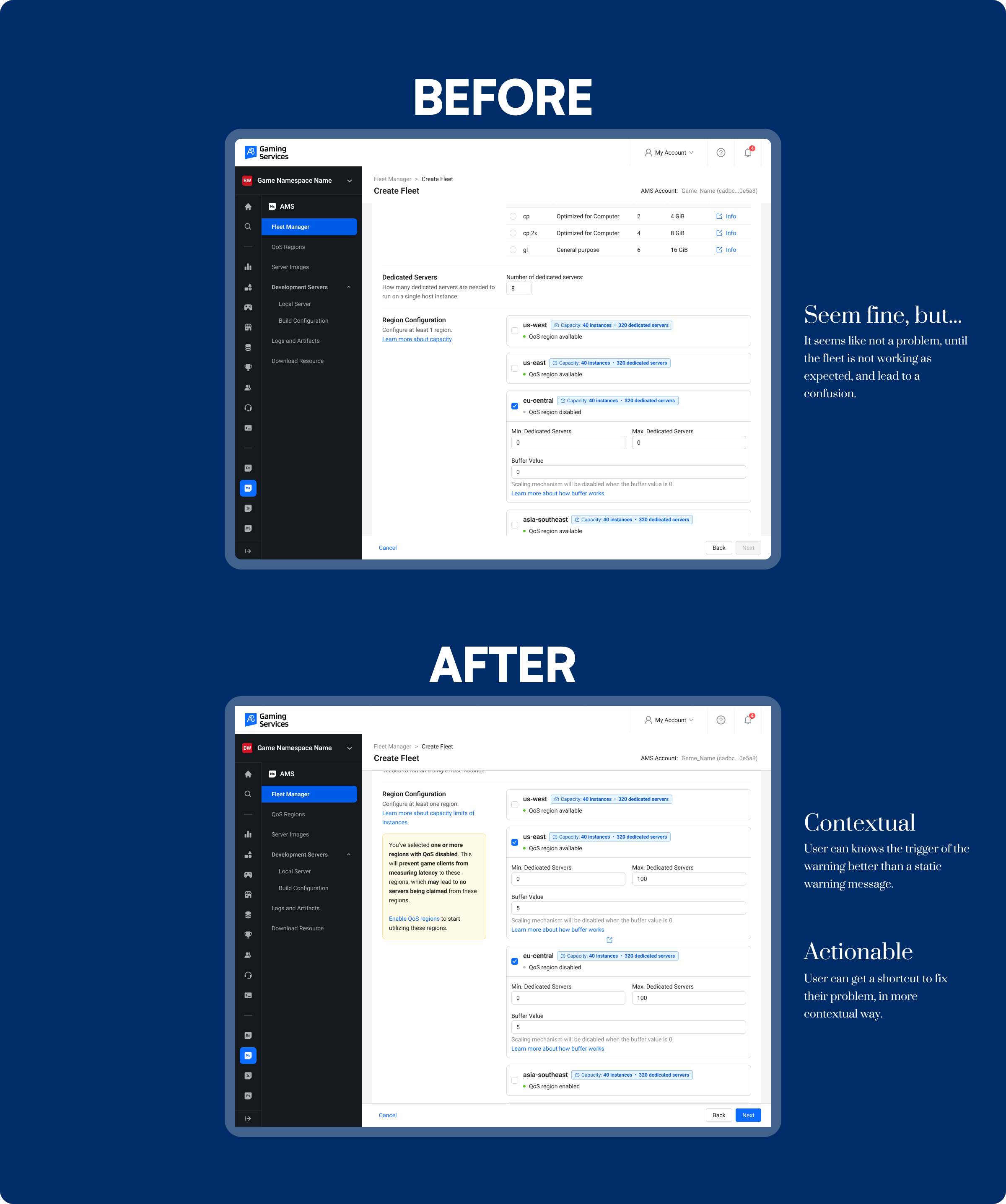
Better clarity when choosing and configuring fleet regions
AccelByte Multiplayer Server

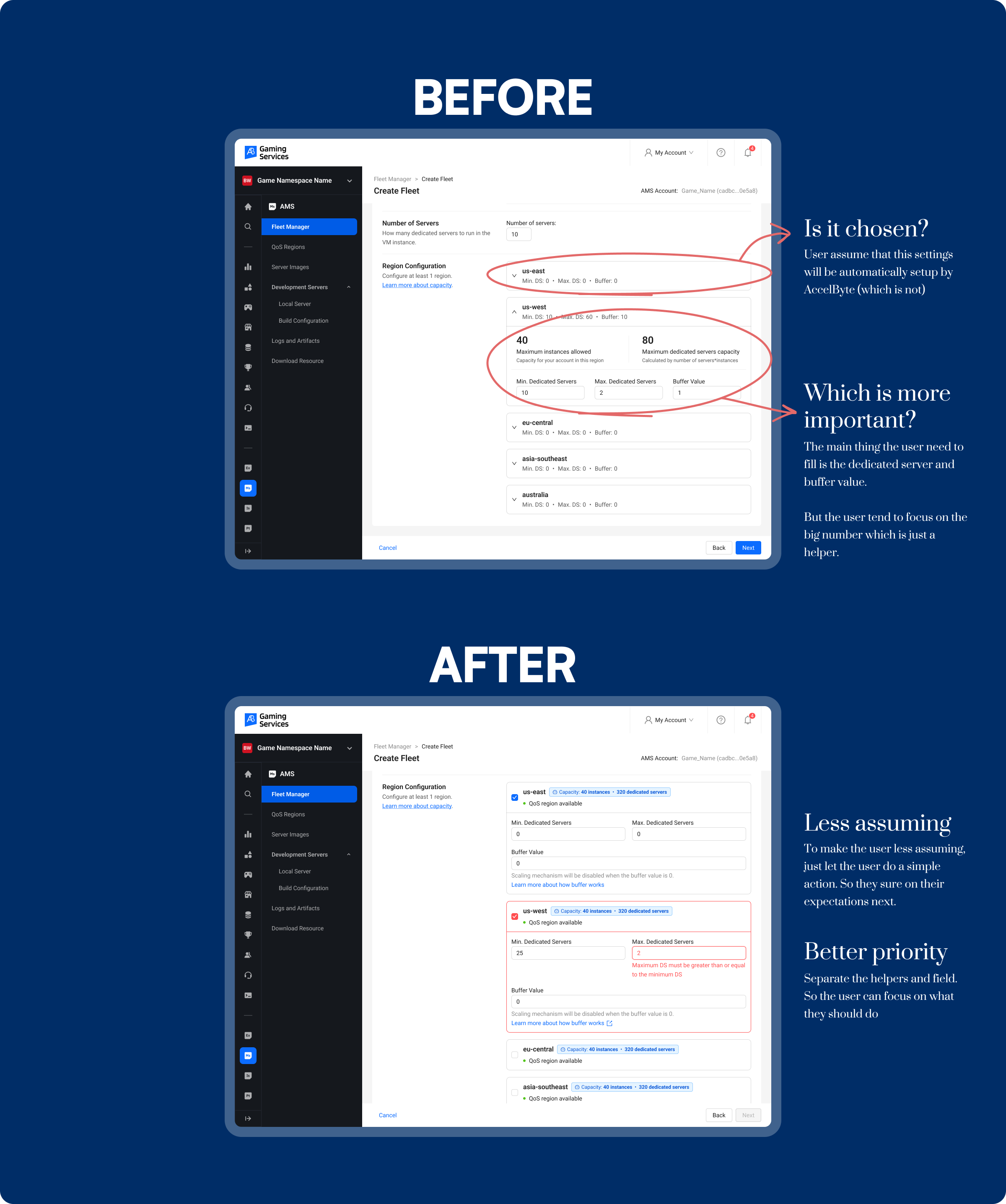
Before and after improvement

One of the essential steps users need to take when running a multiplayer server is creating a new fleet. A fleet is a system that deploys and connects dedicated servers, allowing players to join a game session. To set up a fleet, users must provide several pieces of information and configure fleet specifications—one of the most important being region capacity.

The Problem

Shortly after I joined the project, we received feedback from users reporting that their fleets couldn’t deploy any dedicated servers. They reached out, unsure of what went wrong. After investigating, we found that the root cause was missing configuration in the region capacity. Users simply left it blank, assuming it would be automatically managed. Unfortunately, this wasn’t an isolated incident—many users faced the same issue.

Key  Insights

Our team delved deeper into user feedback and uncovered three main reasons behind this problem:

  1. Assumption of Automation:
    Game admins believed that the region configuration was automatically handled by the system, so they left it blank.
  2. Confusion with QoS Regions:
    Game admins mistakenly thought that setting up regions on the QoS Regions page was sufficient. In reality, QoS (Quality of Service) Regions are used to optimize network performance by selecting the most suitable server region based on latency, while region capacity specifically configures the number of instances available per region.
  3. Lack of Guidance:
    Users weren’t sure what to do in the region capacity section, as the required inputs (like Min. DS, Max. DS, Buffer, and Region Capacity) lacked sufficient explanation. This uncertainty led users to skip the configuration entirely.

The Solutions

To address these issues, we implemented the following improvements:

  1. Interactive Guidance:
    We added a small action prompt to guide users through selecting and filling in the required information, making the process more visible and approachable.
  2. Contextual QoS Information:
    We included brief, informative text about QoS status for each region, clarifying its purpose and how it differs from region capacity.
  3. Clear Explanations:
    We provided contextual information about the key configuration fields (Min. DS, Max. DS, Buffer, and Region Capacity) to eliminate ambiguity and guide users step by step.

These changes significantly reduced confusion and support tickets related to region configuration. Users now better understand how to set region capacity correctly, and the frequent questions about this process have vanished.

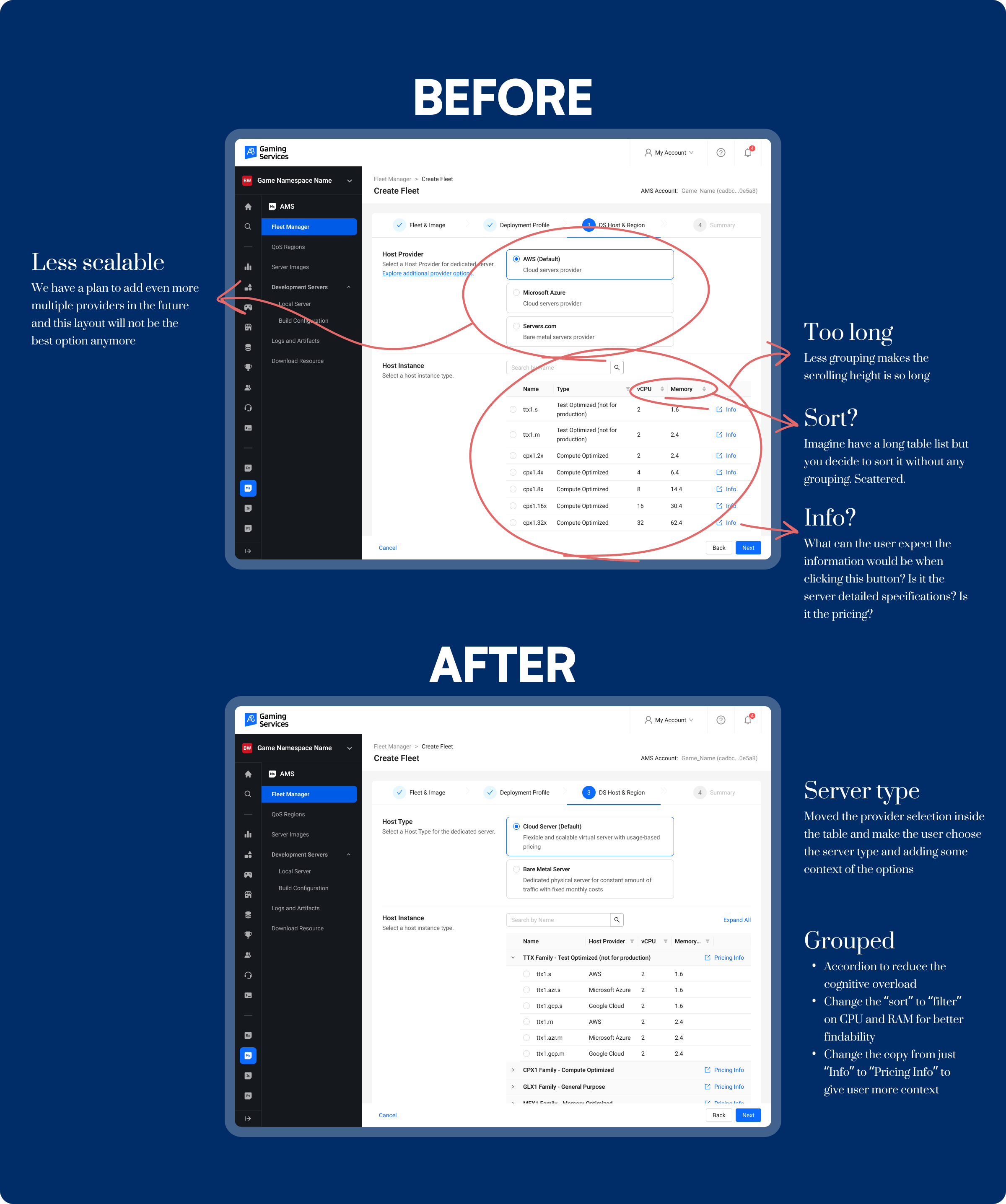
Make instance type selection easier by better grouping and sorting
AccelByte Multiplayer Server

Before and after improvement

One of the key steps users need to take when running a multiplayer server is creating a new fleet. A fleet is a system that deploys and connects dedicated servers, allowing players to join a game session. To set up a fleet, users must fill out several details and choose specifications, with one of the most crucial being the instance/server selection.

The Problem

When I first joined the project, I approached it with a fresh perspective, testing the product as a new user. One challenge immediately stood out: selecting the right instance was time-consuming due to an overwhelming number of options. To validate my experience, I gathered user feedback—and it turned out I wasn’t alone. Many users faced the same issue.

Key Takeaways

After discussions and analysis, here are the key takeaways:

  1. Provider Preference: Game admins often have strong preferences for specific host providers. As the company planned to add more providers, it was important to design a scalable solution.
  2. Decision Hierarchy: Game admins typically prioritize RAM size first, followed by CPU Cores, and finally price.
  3. Pricing Confusion: Users frequently asked for instance pricing, even though a link to the pricing document was already provided—indicating the link was either hard to find or unintuitive.

The Solutions

To address the usability challenges and enhance scalability, I made the following changes:

  1. Improved Scalability:
    • Previously, the instance selection lacked flexibility for future expansions, especially when adding new host providers.
    • I restructured the layout to accommodate multiple providers, ensuring it would remain efficient as new options are introduced.
  2. Server Type Categorization:
    • Instead of listing providers directly in the dropdown, I grouped them by server type, making it more intuitive for users to select the appropriate option.
    • This approach minimizes cognitive load by clearly indicating whether the server is optimized for production, general use, or other specific functions.
  3. Better Organization through Grouping:
    • The original long, unstructured list made it hard to scan and select instances.
    • I introduced an accordion-style grouping based on instance family (e.g., CPU, GPU, General Purpose), allowing users to expand only the relevant category.
    • Changed the interaction from sort to filter based on CPU and RAM to improve findability.
  4. Clearer Information Labels:
    • The ambiguous Info label led to confusion about what the button would display.
    • I replaced it with “Pricing Info” to set clear expectations and reduce uncertainty.

As a result, the confusion around instance selection significantly decreased, and the streamlined process is still in use today.

Improve QoS region's information clarity on region configuration
AccelByte Multiplayer Server

Before and After Improvement

In AccelByte’s Multiplayer Server, there are two types of region entities that serve different yet related purposes:

  1. Fleet Region DS Configuration: Defines the number of Dedicated Servers (DS) available in each region. It sets the capacity for game sessions by specifying Min. DS, Max. DS, and Buffer, based on the Region Capacity.
  2. QoS Region: Determines the Quality of Service by selecting regions with the lowest latency for players. It ensures that game sessions are hosted on the most optimal server location.

The Problem

We encountered cases where users had correctly configured the Dedicated Server and Buffer amount for a specific region, but the fleet still failed to claim a server in that region. After a thorough investigation, including analyzing analytics data, we discovered the root cause:

  • Some users did not activate any QoS region during the setup process.
  • A significant number of users never even visited the QoS page while configuring their fleets.

This confusion arose because users didn’t fully understand the relationship between Fleet Region Configuration and QoS Region—assuming that setting up the DS configuration alone was sufficient.

The Solution

To address this issue quickly and effectively, we implemented the following improvement:

Dynamic Alert:
When users select and fill the Dedicated Server and Buffer amount for a region that has no active QoS, a dynamic alert now appears, informing them that the QoS region must be activated for the configuration to work.

This quick-win solution not only prevents fleet deployment failures but also educates users on the importance of enabling QoS regions—even if they are already familiar with the technical terms.

With this small but strategic update, users now receive real-time feedback during setup, significantly reducing configuration errors. This proactive alert serves as a subtle educational touchpoint, helping even advanced users avoid common pitfalls.

Project Background

As Surabaya is a big city and capital of East Java, public transport is a mandatory to help the residents moreover the foreigners to commute from one area to another places like the landmarks, malls, campuses, or even offices with an affordable price. There are a lot of alternative transportation models like online transportations, but the price is significantly higher than using the public transport.

There are a lot of things that need to be fixed, moreover from the facilities, but one of the other problem that makes the passengers feel hesitant to use it is the routes, moreover for the newly settled foreigners that didn't really have a good navigational sense of Surabaya city yet. Even for myself that spent my time mostly in Surabaya, I still feel the same. And with the companion app like Mitra Darat, I think we can solve it there.

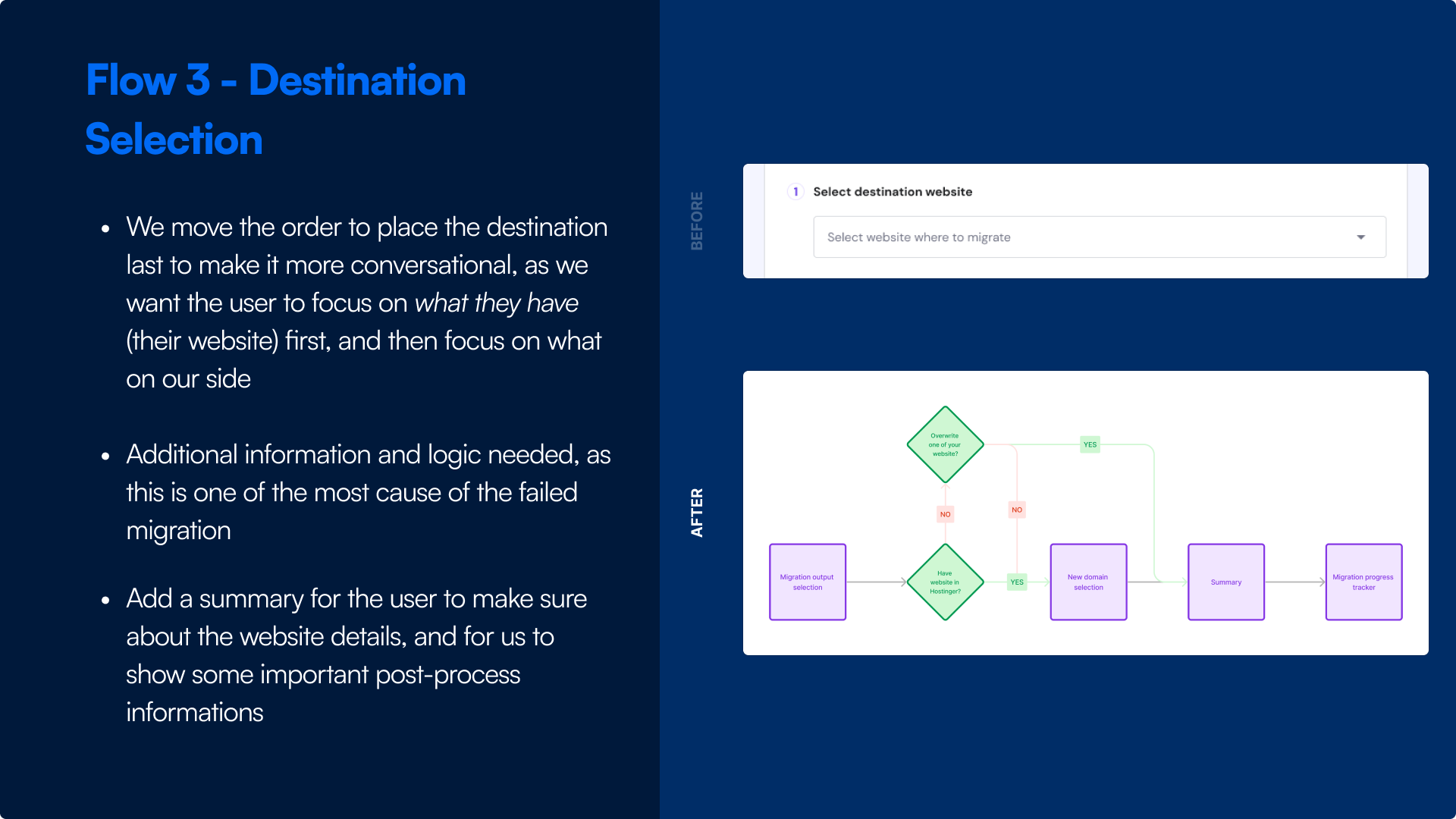
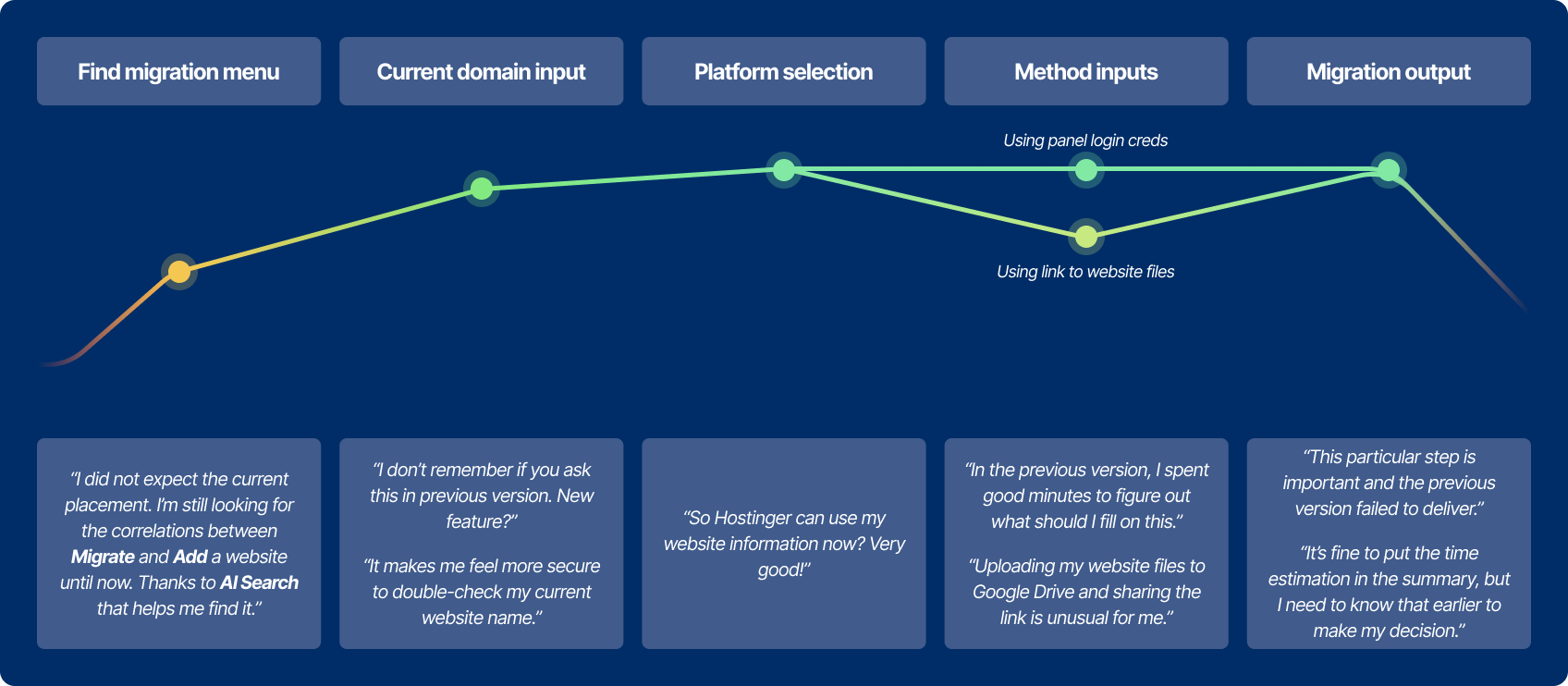
Migration issue has the most tickets from customer success team
Only ~20% from the total visitors are successfully submitted
From the successfully submitted requests, less than half of them are successfully migrated

Discovery

The problems that we discovered are still wide, so we need some further and deeper research to get into the core problems and what disrupt the users from achieving their goals.. For this case, I used these methods:

User interview

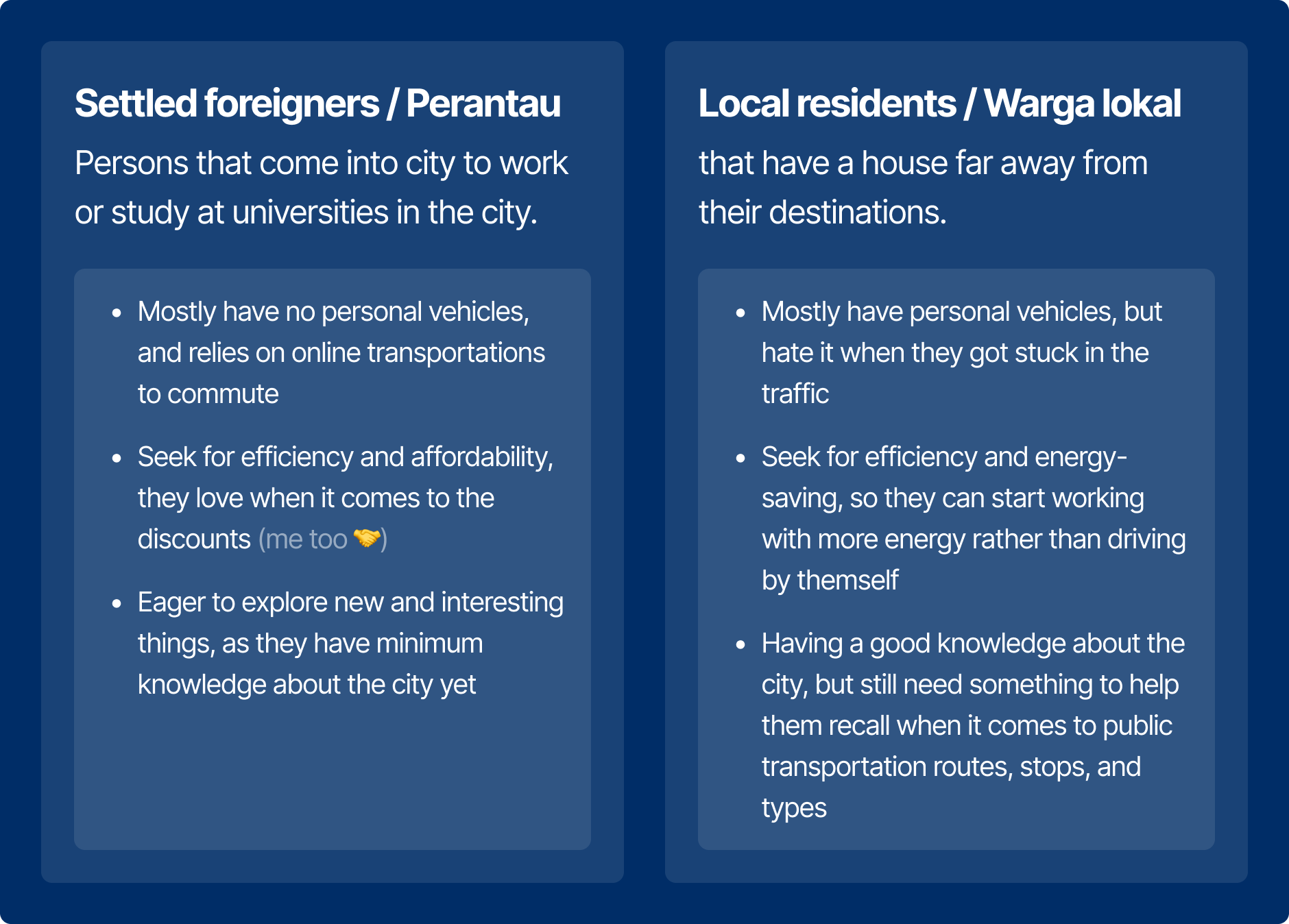
I used interview to get a better understanding of the passengers. I asked four passengers that have the same route and share the same seat as me to be asked, and here is the result:

Other than those two, there are also another segments: Vacational passengers (only use it for vacation purposes), so this app is not really helping them. So in this case, I only focusing on the Daily passengers segment.

UX audit of the app

Beside the interview, I also try to audit the app as a new user of the apps that want to go to specific location. And here what I found:

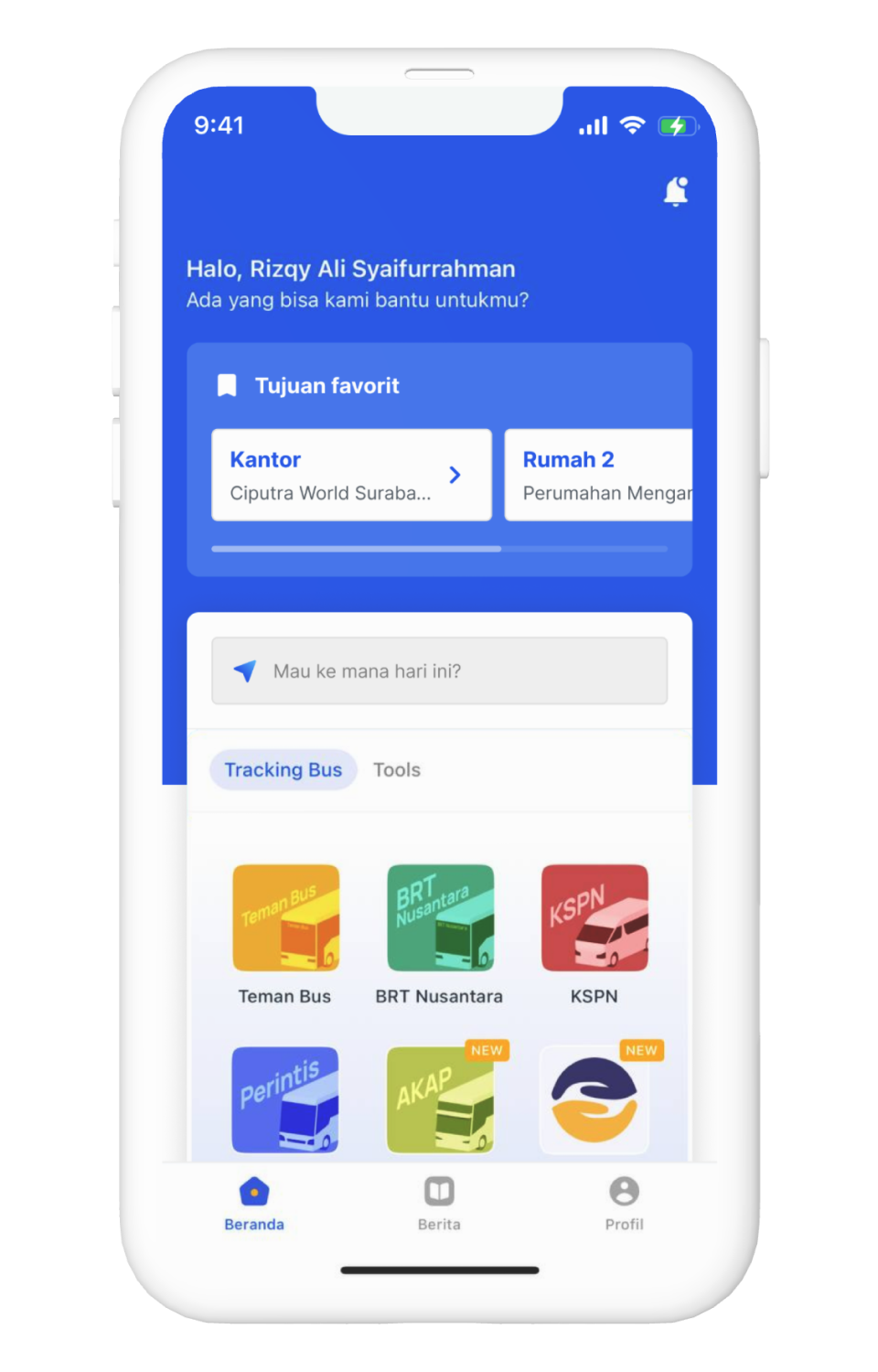
  1. The first thing that I saw is the list of the bus service provider, which is I don't really know them, at all. As a person that want to go to specific location, it has nothing to do with my goal.
  2. After clicking one of the service, I saw the city options. Beforehand, this app already ask for my current location after installing, so I don't really know why this app asked me to enable that.
  3. After choosing Surabaya, I saw the whole map with the routes. As someone who is not really know about the routes, this map is meaningless, because I don't know where the closest bus stop to my area and my destination.
  4. In the route details, there is a button to track specific bus, which is meaningless. As a passenger, I only care about the closest bus to start the route.
  5. The list of bus stop is needed somewhere, but can be improved by adding information about where should I start the route or where should I stop for my destination.
Basic plan
$180/yr
Save 20%
Feature text goes here
Get started
Business plan
$280/yr
Save 20%
Feature text goes here
Get started
Enterprise plan
$480/yr
Save 20%
Feature text goes here
Get started

From those researches, we get these key themes and insights:

In summary,

Settled foreigners and local residents that have a house far away from the city need something to help them commute using public transport, so they can use the public transport easily in daily basis and saving time, energy, and money

Constraints and challenges

Main concept

From the mentioned constraints, me and the team converge the rough ideas into the main concept, we can quickly get the idea and refer to this main concept.

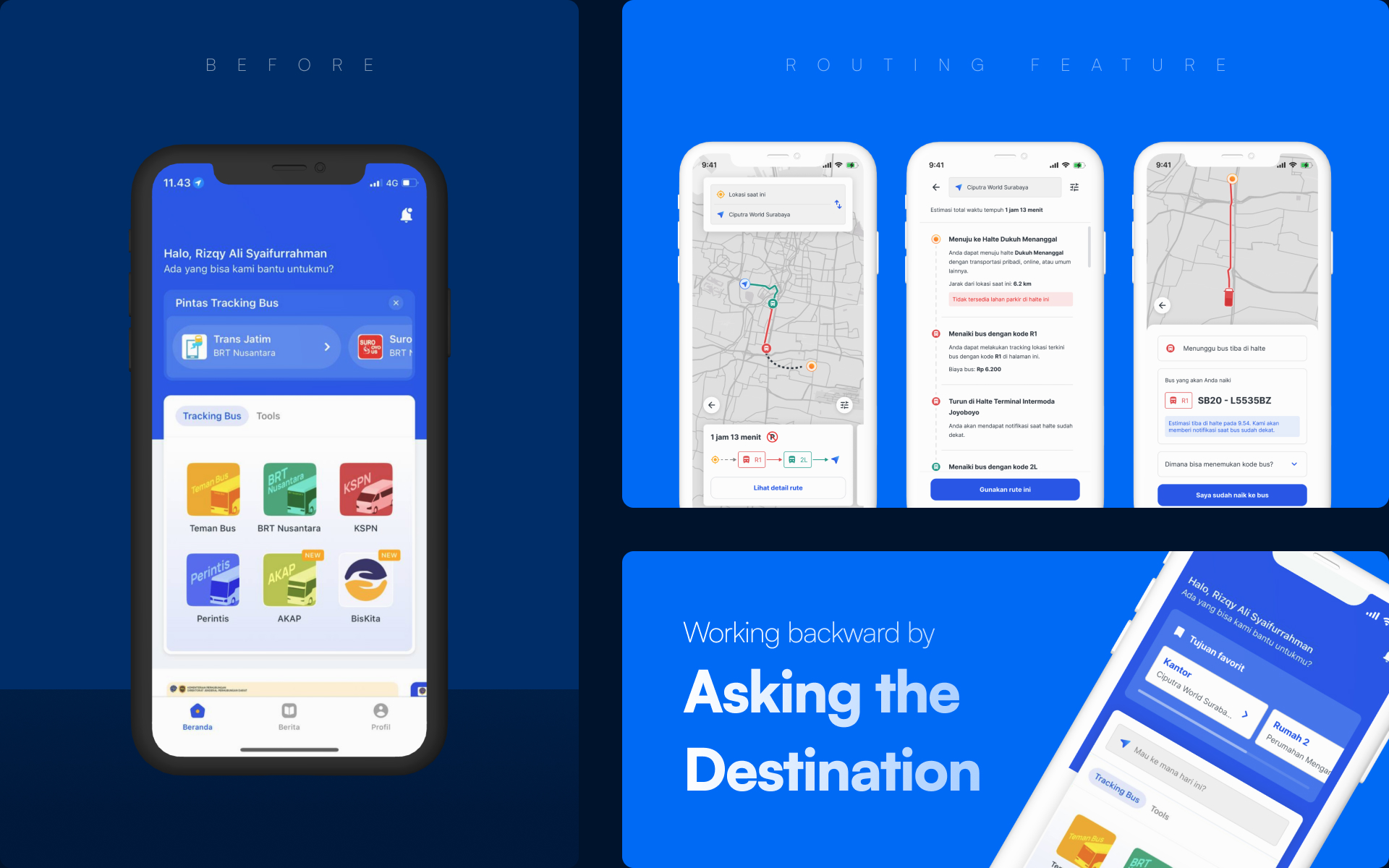
Start by the end

The main goal of the user is to go to their destination, so to make the user feels like reaching their goal, we can give them the keyword of the goal.

By asking the destination, we can solve their main problem, which is navigation, so hopefully the user can use the public service in their daily basis.

Notify everything

One of the first-time passengers' problem is they didn't really know where to start the trip, what bus that they need to ride, and where to stop the trip. So we can help them by giving them notifications on their mobile phone.

This is reinforced by their habit of using earphones during the trip, moreover for the students and young-adult segments.

Basic plan
$180/yr
Save 20%
Feature text goes here
Get started
Business plan
$280/yr
Save 20%
Feature text goes here
Get started
Enterprise plan
$480/yr
Save 20%
Feature text goes here
Get started

New user flow

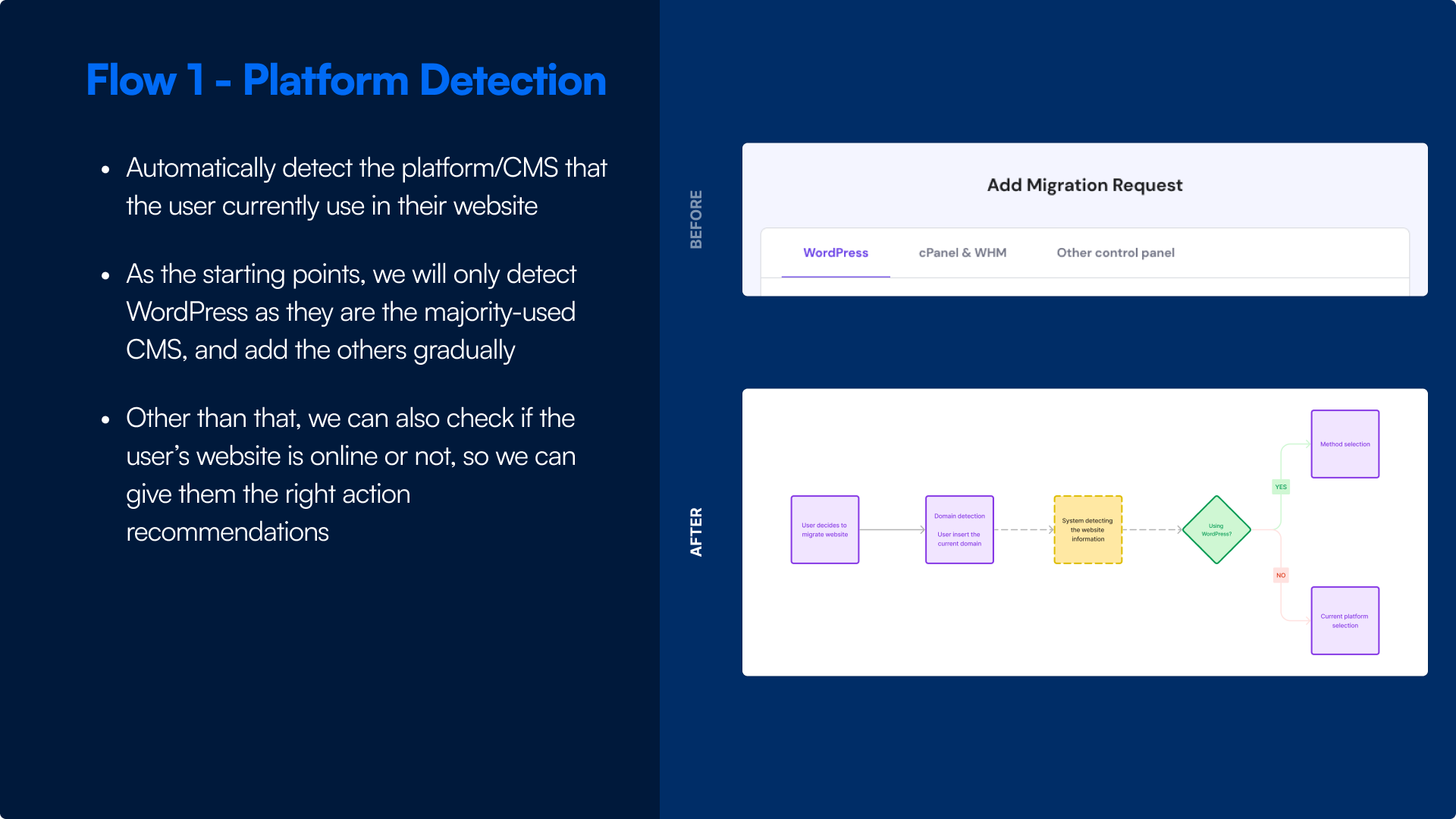
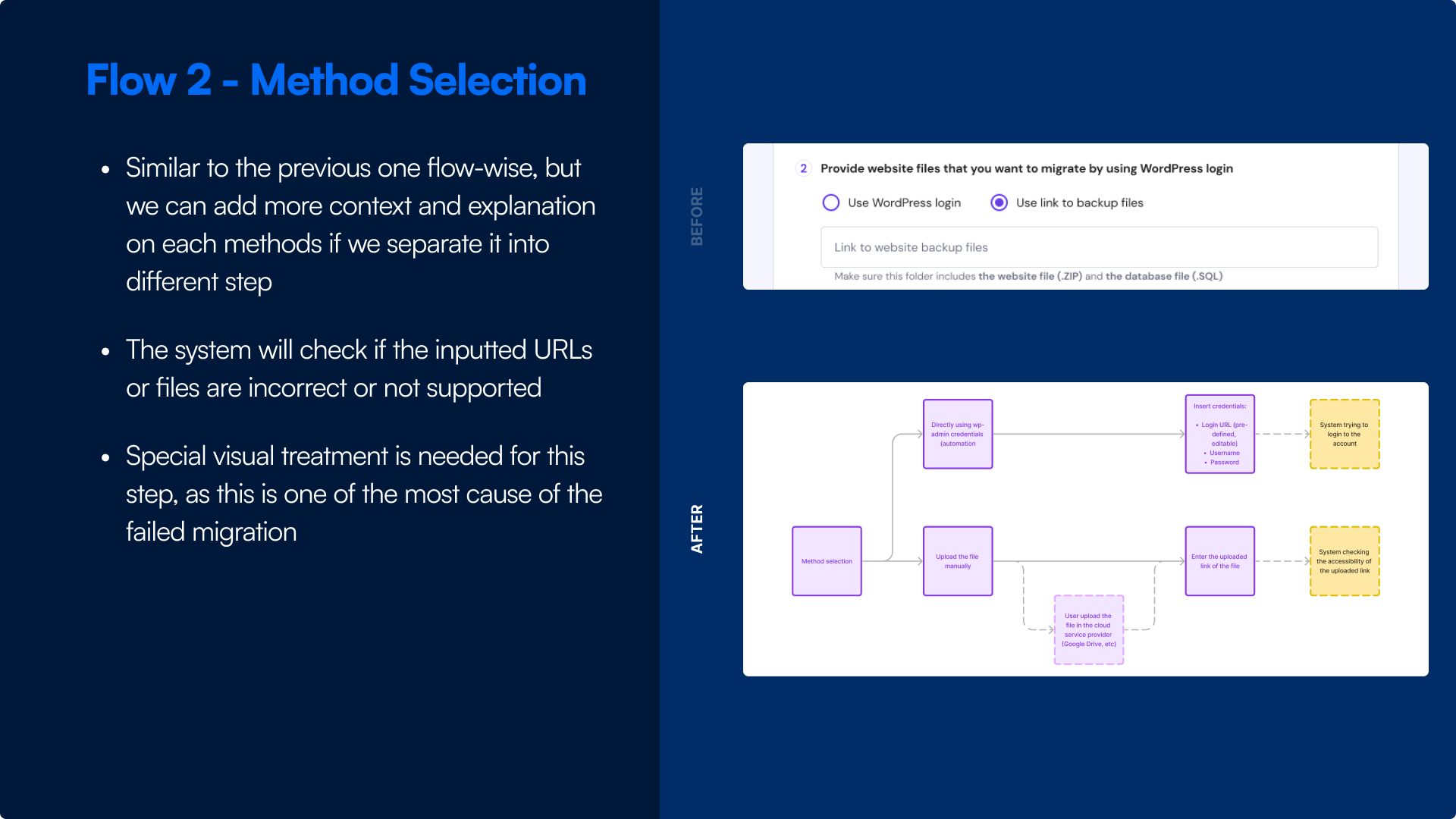
From previous main concept, we decided to break the page into several key steps: Platform Detection, Method Selection, and Destination. We also add a summary to let the user double-check and validate their website information before requesting.

Click here to open the full resolution of the flow

Layout and illustrations

Simple selection image

Illustration for indicating something simple and not needing any more explanations, like platform logos.

Instructional image

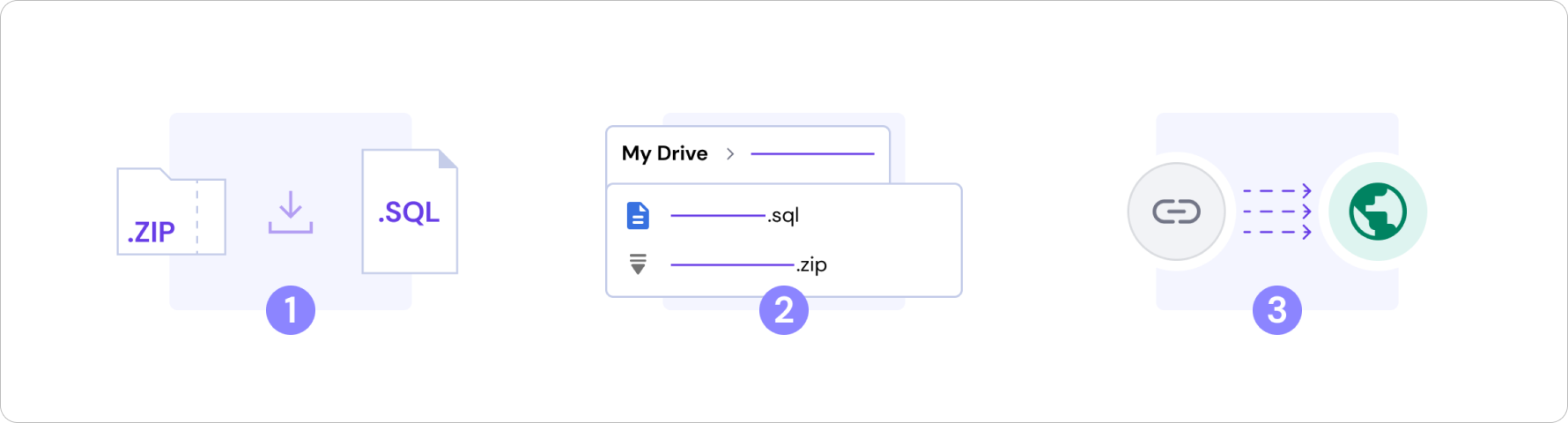
Illustration for giving the user guidance for something that they think is hard to do or needing more context, like uploading a file, because there are a lot of steps that they need to do.

Action selection image

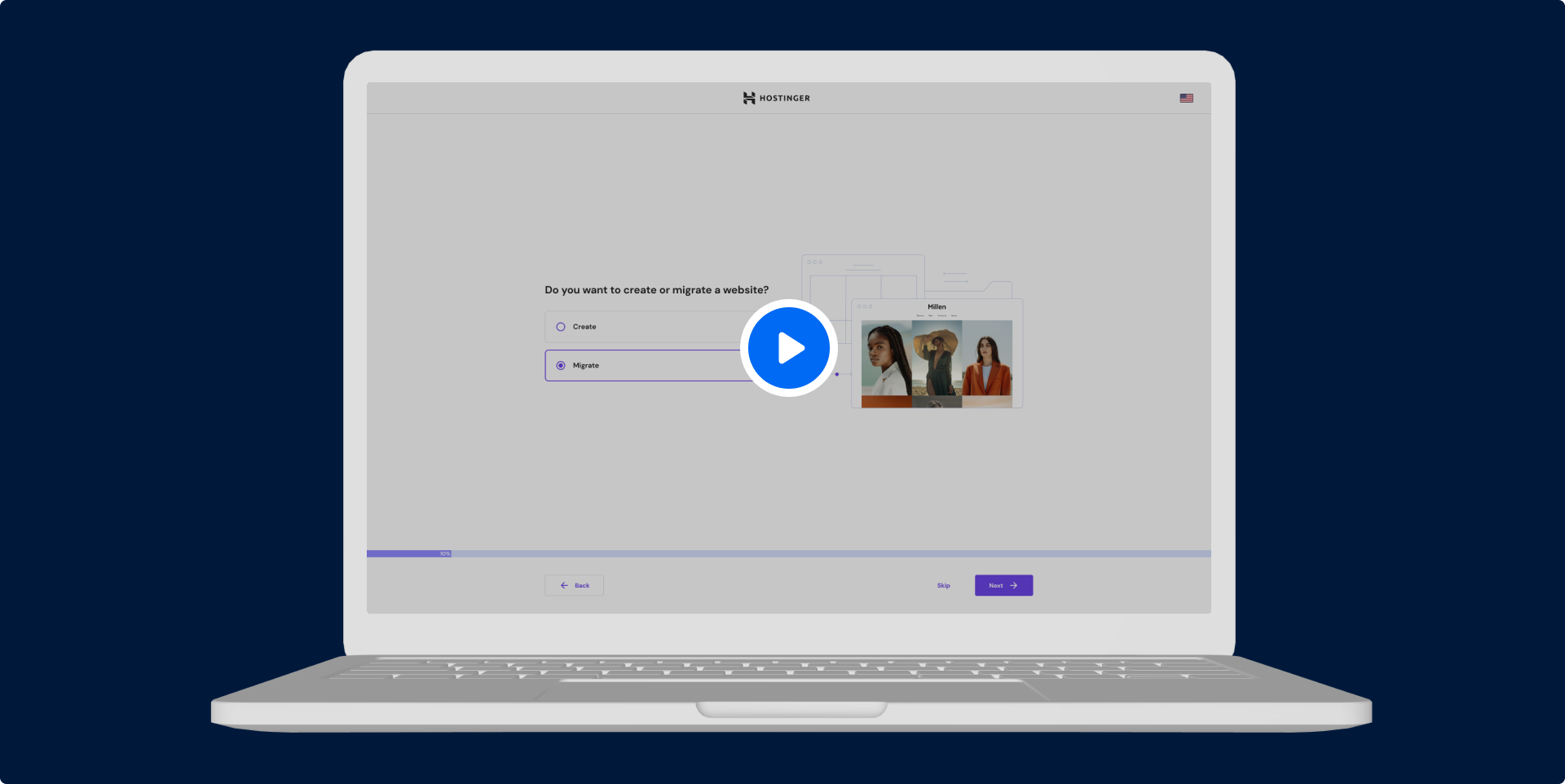
Illustration for indicating an actions that they will do, so the users can foresee what they will do next, like in methods selection.

Conditional image

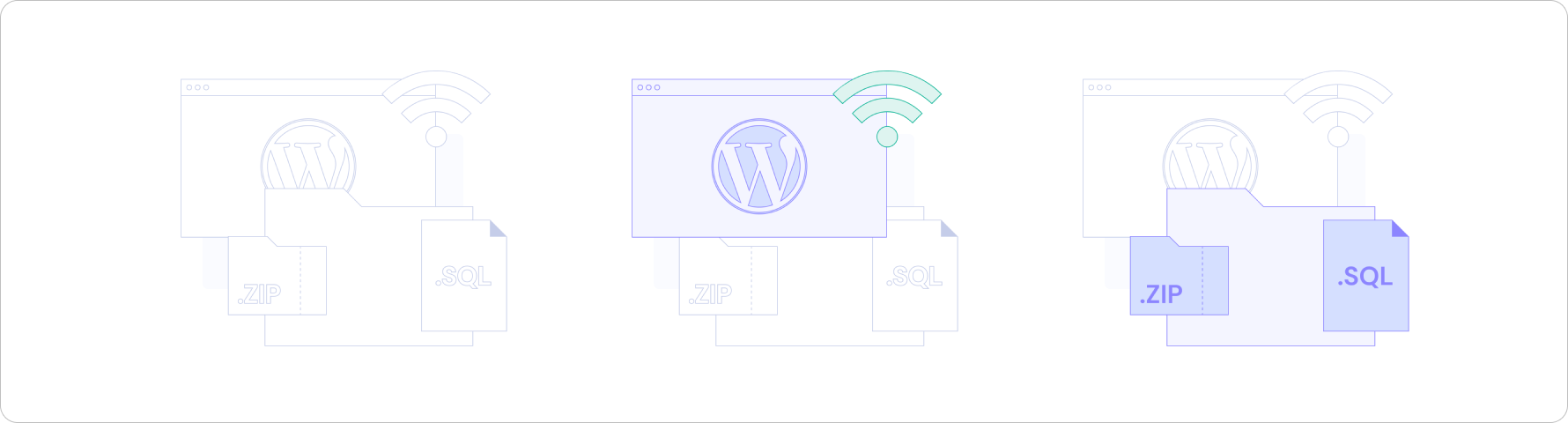
Illustration for indicating the conditions that will happening after choosing several questions, like when the users choosing the output destinations of their website.

Basic plan
$180/yr
Save 20%
Feature text goes here
Get started
Business plan
$280/yr
Save 20%
Feature text goes here
Get started
Enterprise plan
$480/yr
Save 20%
Feature text goes here
Get started

Interactive prototype

Here is the final result of the project. This one is the base iteration that the team will explore more and evaluate. So there will be a lot to be evaluate and iterate in the future.

Click the image or here to open the prototype

Key pages

Here is the design of the key pages of the feature. These pages are the one that can solve the passengers' problem regarding to the navigation.

Disclaimer: I concepted this without any detailed technical specs, and only based on my own assumptions and experiences on designing an online transport apps.
Additional form to input destination

As I state before, I want to ask the goal, which is the destination, upfront. And the right placement of this input is inside the main bus service selection section that takes a lot of attention.

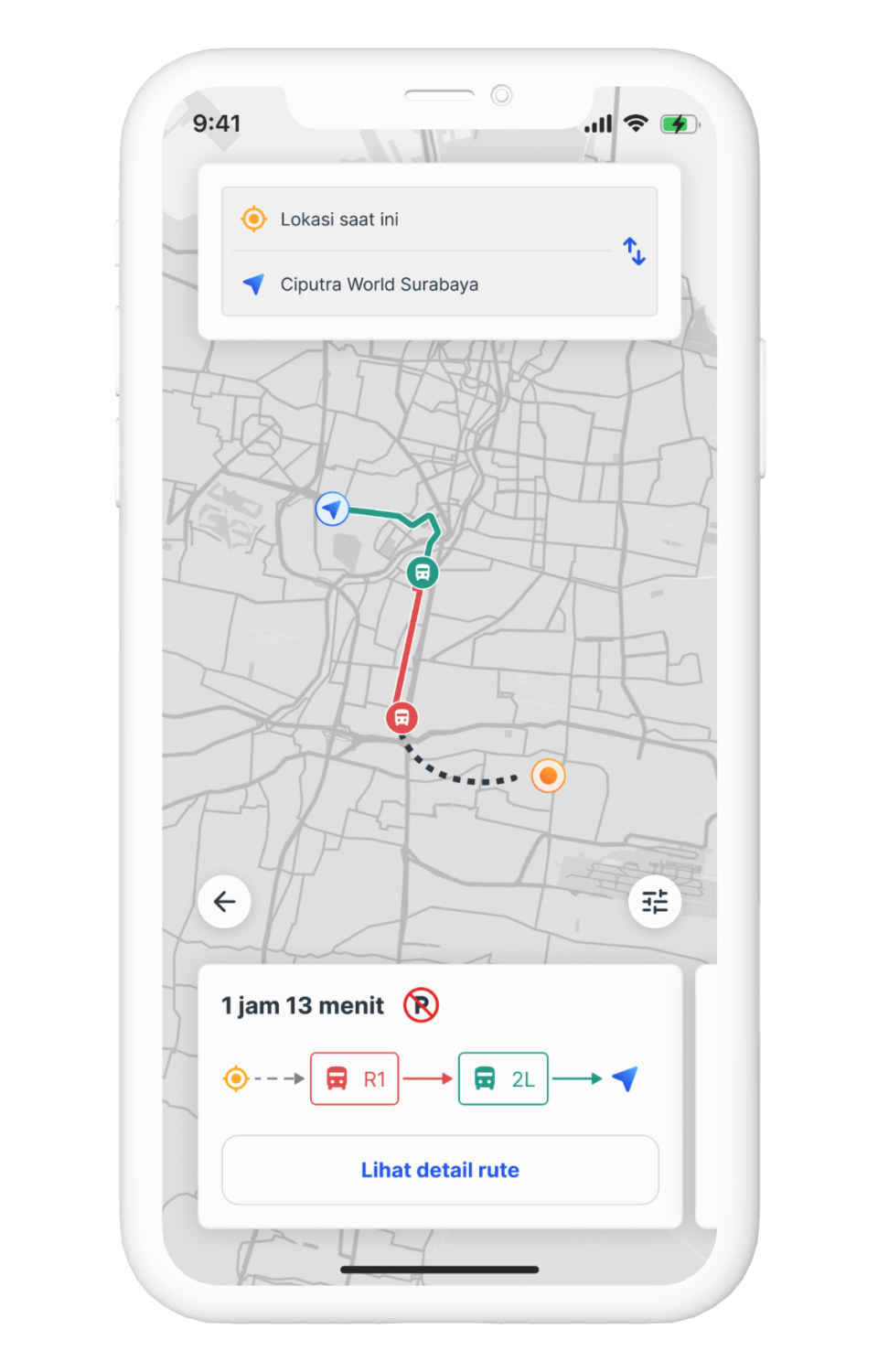
Route selection screen

In this screen, I want to give the user a summary of the main information that the passengers need when using a bus service. Here I show the route summary (in map), estimated time, and bus type that they will use.

I also add the parking availability. So the passenger that using their own vehicle can expect where to park their vehicle.

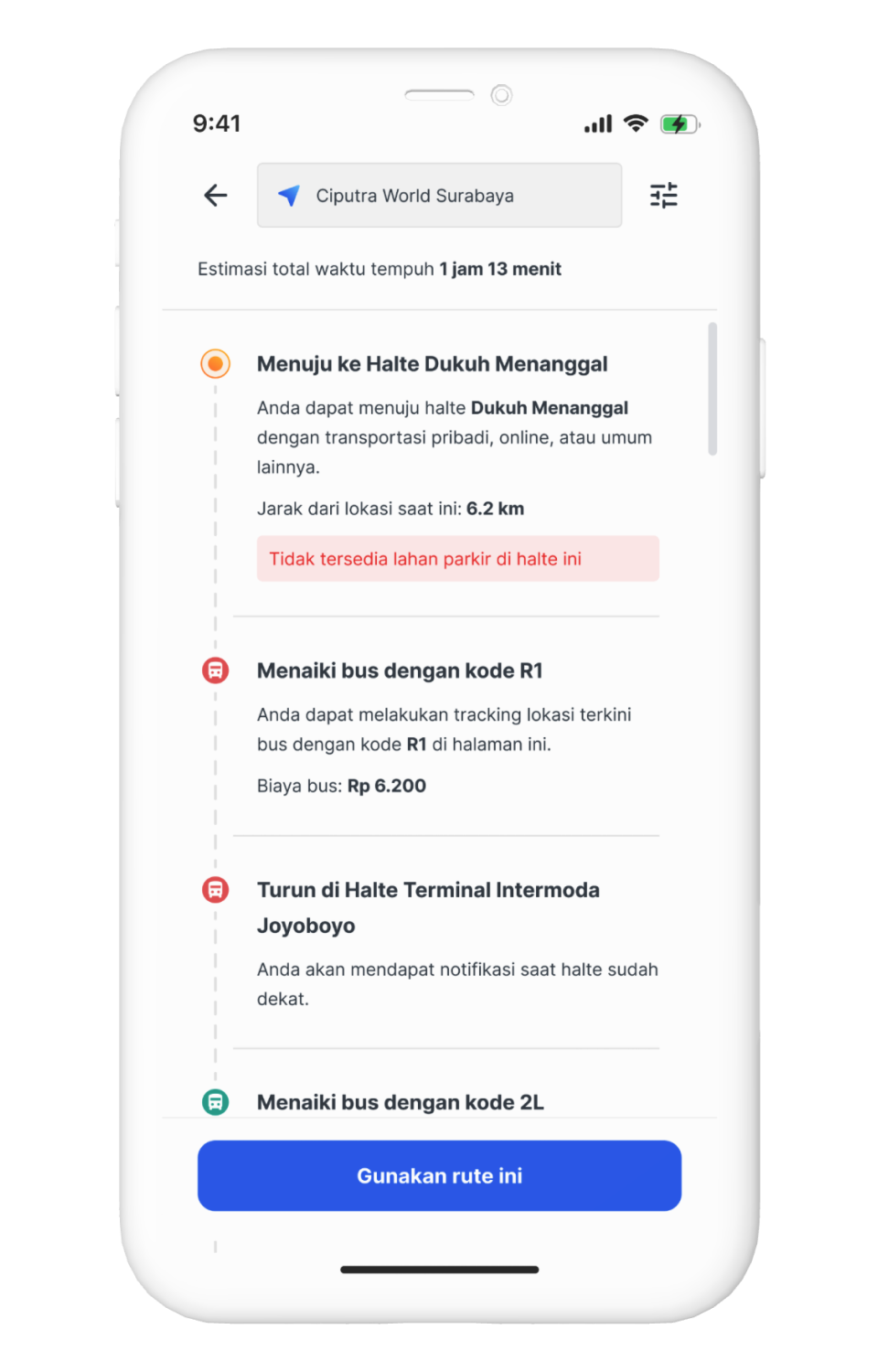
Route details screen

This will be the details of the route summary. Passengers will see the details like the starting bus stop including the distance from their current position, bus type that they will use including the price, where to switch the bus type if needed, and the final bus stop near the destination.

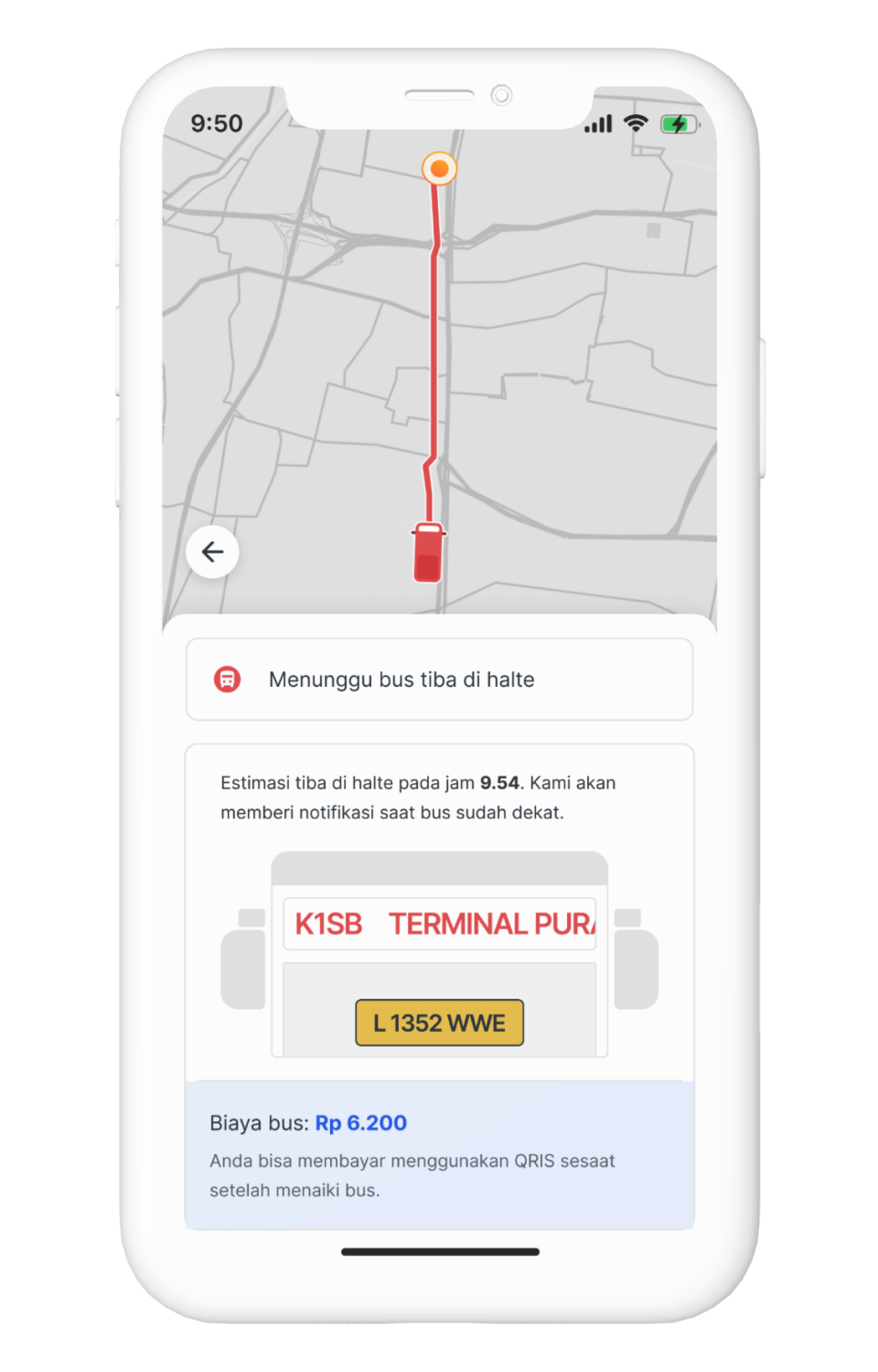
Roaming screen

This will be the screen after the passenger hit Use This Route button from previous screen. There will be various states of this screen depend on what state the passenger into.

For example in this screen, is the state when the passenger is waiting in the bus stop. In this case, I show the live location of the bus (yes, the bus already have a GPS tracker), the price, vehicle license number for easier identification, and the bus code that reflect how the bus code shown in real life (most important).

The states will automatically switched after reaching certain checkpoints for easier interaction. Just like in mainstream ride hailing platforms.

Basic plan
$180/yr
Save 20%
Feature text goes here
Get started
Business plan
$280/yr
Save 20%
Feature text goes here
Get started
Enterprise plan
$480/yr
Save 20%
Feature text goes here
Get started

Evaluative research

As the development goes because of the tight timeline, I tried to evaluate the approach to the users so we can mitigate the worst part better and to define what to do next faster so we can deliver it faster as well.

In this case, I used:

Number of testers

6

Task completion

100%

Satisfaction on new deign

93,33%

Basic plan
$180/yr
Save 20%
Feature text goes here
Get started
Business plan
$280/yr
Save 20%
Feature text goes here
Get started
Enterprise plan
$480/yr
Save 20%
Feature text goes here
Get started

Goal and impact measurement

We solved the problem,
so what's next?

Basic plan
$180/yr
Save 20%
Feature text goes here
Get started
Business plan
$280/yr
Save 20%
Feature text goes here
Get started
Enterprise plan
$480/yr
Save 20%
Feature text goes here
Get started

Prototype preview

As Figma has a new policy regarding to their sharing policy, I can't give any access to try this interactive prototype. But, to demonstrate how the final design solution, I attached the video recording of the prototype.

As this project is only just-for-fun, I didn't really do any testing for this design.

Interested to talk further?

Feel free to getting in touch with me by hitting the button right there